English
 Bulgarian
 Russian


Find your BULSTAT and property account number and pay your local taxes from abroad through ePay.bg.
Contents
If you own a property in Nesebar, Sunny Beach, Sveti Vlas, Ravda or any other place in Nesebar Municipality, you pay two local charges every year: property tax and a waste collection fee. You can pay both online from abroad, without a Bulgarian bank account or a visit to the municipality. The process takes about 15 minutes once you know two numbers: your BULSTAT number and your property account number. This guide shows how to find them and how to pay through ePay.bg.
We wrote this guide after helping an owner who had never visited her apartment and had not paid since 2020. The debt itself was small, but interest had been added every year, and unpaid local taxes must be cleared before a property can be sold.
What is a BULSTAT number?
BULSTAT is the Bulgarian register of persons and organisations that do not have a Bulgarian personal number (EGN) or a company number. Foreigners who own property in Bulgaria are registered there, and the BULSTAT number they receive works as their tax ID. The municipality uses it to keep your property tax account, and you need it to check and pay your taxes. The register is public, so you can look up your number yourself in a minute.
Step 1: Find your BULSTAT number
- Go to bulstat.bg and open Public access reports (“Справки с публичен достъп”).
- Choose BULSTAT entity report (“Справка за субект на БУЛСТАТ”).
- In the Name field (“Наименование”), type your name in Cyrillic exactly as it appears in your title deed, and click Search (“Търсене”).
- Your BULSTAT number is shown in the first line of the result, BULSTAT code (“Код по БУЛСТАТ”). The report also shows the address of the property.
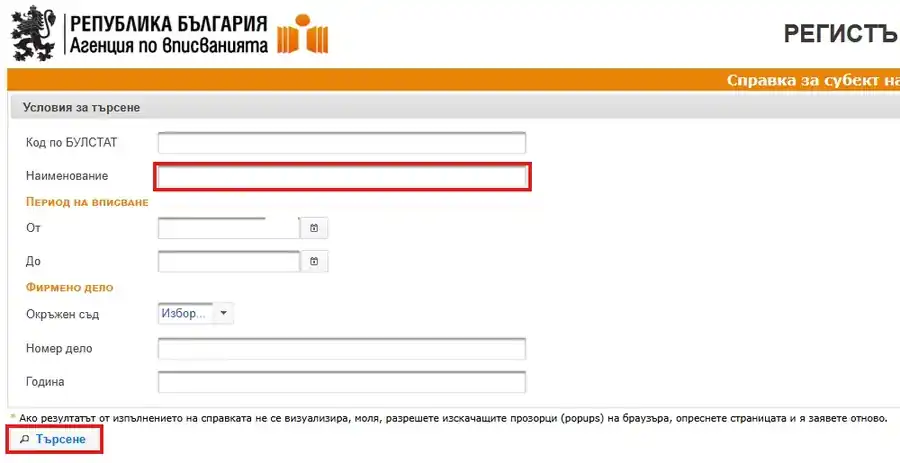

The register is only in Bulgarian. If you use Google Chrome, right-click on the page and choose Translate to English to read it.
Important: the name must match the Cyrillic spelling in your title deed letter by letter. If you get “No result found” (“Няма намерен резултат”), check the spelling in your notary deed and try again.
Step 2: Work out your property account number
The municipality keeps a separate tax account (“партида”) for each property. In Nesebar Municipality, the account number is usually your BULSTAT number followed by 001. If you own a second property in the municipality, its account usually ends in 002, and so on.
If the property has two owners, the account is opened under the BULSTAT number of one of them. Both owners pay into that same account, but each uses their own BULSTAT number in front of it.
In ePay, you type your BULSTAT number, a dot, and the property account number, with no spaces. For example, with two co-owners:
| Owner | BULSTAT | Property account | What to type in ePay |
|---|---|---|---|
| Owner A (account holder) | 123456789 | 123456789001 | 123456789.123456789001 |
| Owner B (co-owner) | 987654321 | 123456789001 | 987654321.123456789001 |
If you have an old payment slip or a tax notice from the municipality, the account number is printed there. If you are not sure, the municipality's local taxes office can confirm it.
Step 3: Create an ePay.bg account and add a card
ePay.bg is the most widely used online payment system for bills and local taxes in Bulgaria.
- Go to www.epay.bg and switch the language to English at the top of the page.
- Click Register and follow the steps. You will confirm your email address and mobile phone number.
- After you log in, open Cards and accounts and add your bank card. ePay will guide you through a short card verification.
Step 4: Register your tax bill
- On your ePay home page, under Pending bills, click Add new bill.

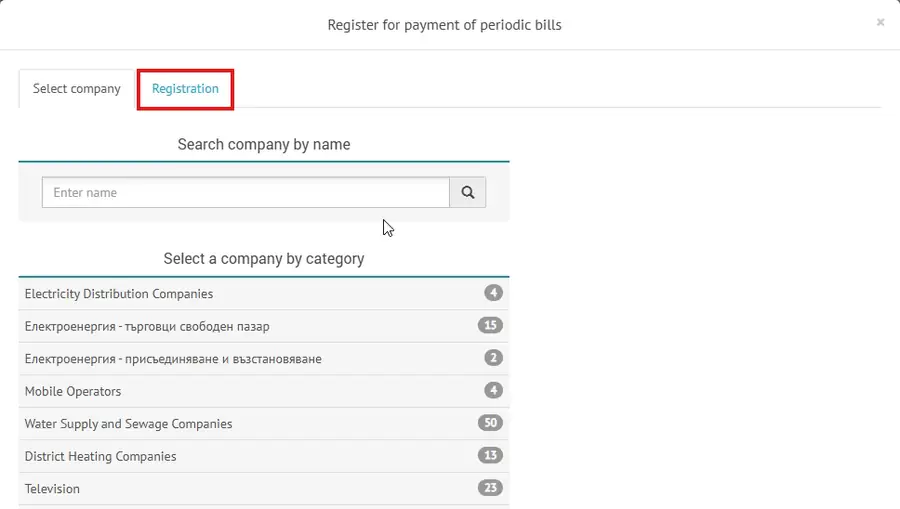
- In the window that opens, click the Registration tab.
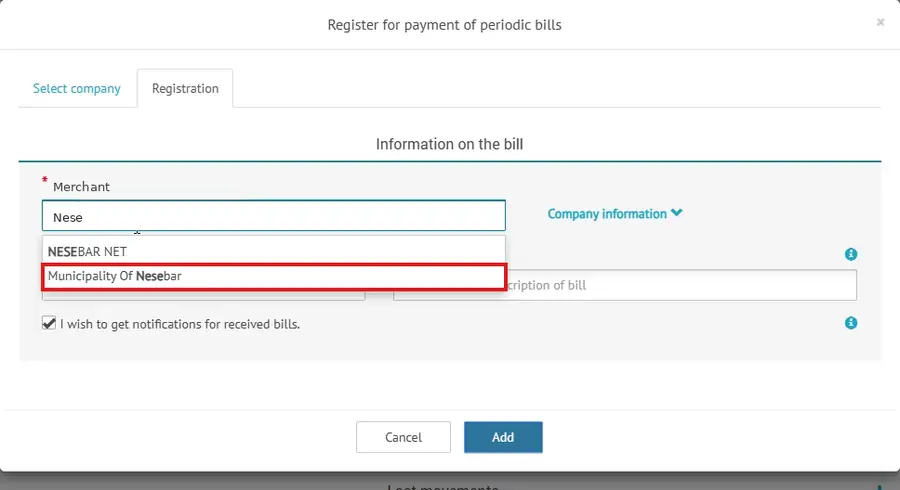
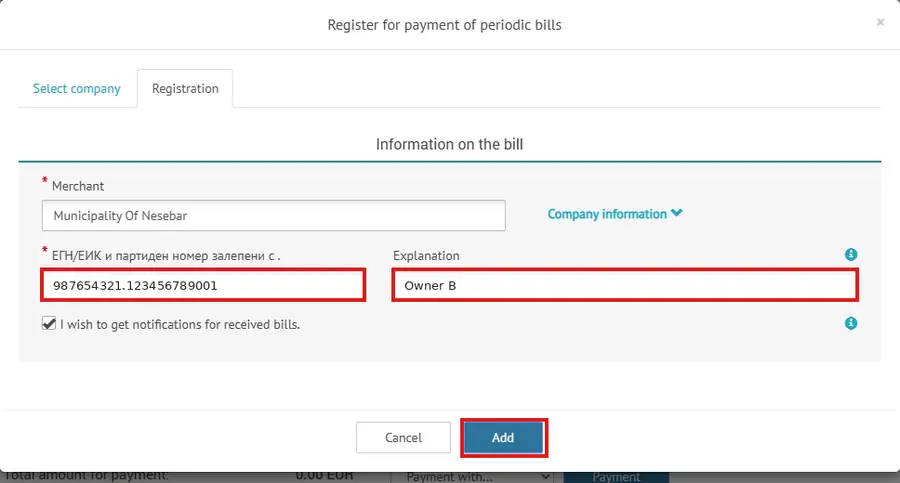
- In the Merchant field, start typing “Nese” and select Municipality Of Nesebar.
- In the second field (labelled in Bulgarian: “ЕГН/ЕИК и партиден номер залепени с .”), type your BULSTAT number, a dot and the property account number, as shown in Step 2.
- In Explanation, type a short label you will recognise, for example the owner's name or the property.
- Click Add.
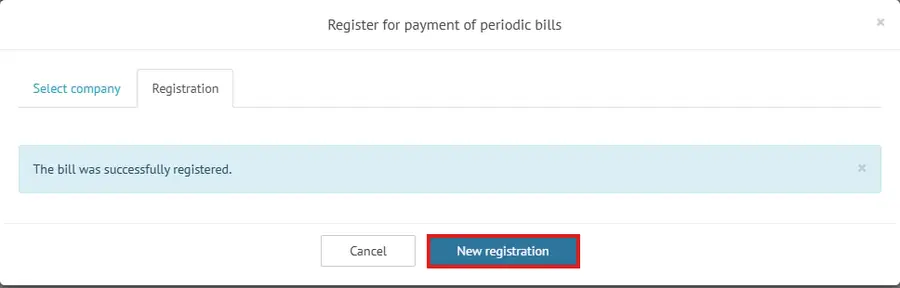
You will see “The bill was successfully registered.” If there is a second owner, click New registration and repeat for them.
Step 5: Pay
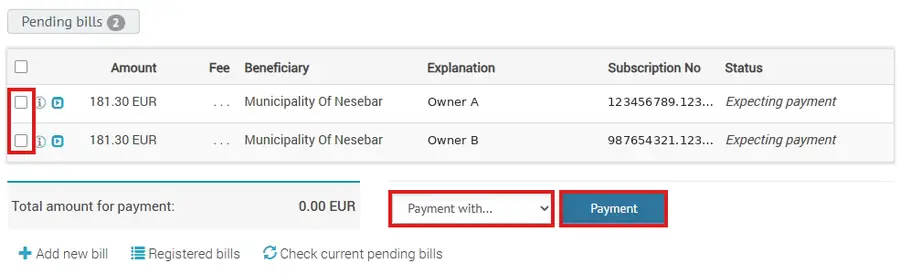
Close the window. Your bills now appear under Pending bills, with the amount due. If you don't see them yet, click Check current pending bills.
- Tick the box next to each bill you want to pay.
- In Payment with…, choose your card.
- Click Payment and confirm.
The payment appears in Last movements. Keep the confirmation: it is your proof of payment. The bill stays registered in your account, so next year you only need to log in and pay. If you keep “I wish to get notifications for received bills” ticked, ePay will let you know when a new amount is due.
Stuck at any step? Write to us at home@homeoption.eu or call +359 895 651 166, and we will help you find your BULSTAT or account number.
Deadlines and the 5% discount
Property tax is paid in two equal instalments: by 30 June and by 31 October of the year it is due for. If you pay the full amount for the year by 30 April, you get a 5% discount on the property tax.
The waste collection fee is paid together with the property tax and appears in the same bill in ePay. Amounts change every year, as each municipality sets its own rates.
Other ways to pay
If you are in Bulgaria, you can also pay at any EasyPay office or at the local taxes office of Nesebar Municipality. You will need your BULSTAT number or the property account number. A bank transfer to the municipality is also possible, but you must state the correct account number in the payment reason, or the payment may not be matched to your property.
What happens if you don't pay
Unpaid local taxes do not disappear. Interest is added every year, and the municipality can collect the debt by enforcement. When you sell, the notary requires a certificate that the property has no outstanding local taxes, so any old debt must be paid before the deal. Checking once a year in ePay takes a few minutes and avoids surprises.
Need help with your property?
If you live abroad and need someone local to look after your property, check documents or handle a sale, we can help. Our team speaks English and Russian. Contact us.